AI-powered LinkedIn content tool

Stop writing posts.
Start approving them.

PostIn writes every LinkedIn post in your exact brand voice — with scroll-stopping hooks — formats it for maximum reach, and auto-publishes on your schedule. You just review and hit approve.

✦ AI Post Writing 🪝 Hook Generation 📝 Smart Formatting 📅 Auto-Publishing
Official LinkedIn API AI by Anthropic (Claude) Razorpay secured No auto-renewal

★★★★★ Loved by LinkedIn professionals
postin.in/writer.html — AI generating your post
PostIn AI writer — Claude generates a full LinkedIn post in your brand voice
Official LinkedIn API — no third-party access · AI by Anthropic (Claude) · Payments by Razorpay · No auto-renewal. No hidden fees.
Everything in one tool

PostIn is not just a scheduler.
It's your entire LinkedIn engine.

AI Post Writing

Claude AI writes complete LinkedIn posts in your exact brand voice — using your own prompt templates and writing style. Not generic. Not robotic.

🪝

Scroll-Stopping Hooks

The first 3 lines decide everything. PostIn generates multiple hook options per post and picks the one most likely to stop the scroll and earn the "see more" click.

📝

LinkedIn Formatting

Unicode bold, proper spacing, emoji density control, and auto-injected hashtags. Everything the LinkedIn algorithm rewards — applied in one click.

Review & Control

Every post goes through your approval. Read it, edit inline, approve or reject. Nothing publishes without your explicit sign-off.

📅

Auto-Publishing

Assign posts to dates. PostIn publishes to LinkedIn at exactly the right time via the official LinkedIn API — no browser extension, no babysitting.

📤

Standalone Formatter

Already have a draft? Paste it or upload a Word doc. The formatter transforms any raw text into a polished, LinkedIn-ready post instantly.

The problem with LinkedIn

Great content takes time.
You don't have it.

You know LinkedIn builds pipeline. But writing, formatting, hooking, and scheduling quality posts every single week — while running your actual business — is a full-time job.

✍️

Writing is the hardest part

Staring at a blank page for 45 minutes to write 200 words. Every. Single. Week. And it still doesn't sound like your best work.

🪝

Bad hooks get ignored

90% of people never click "see more." If your first 2 lines don't stop the scroll, nothing else matters — and writing great hooks is a skill most people haven't mastered.

📝

Formatting kills reach

Walls of text, missing bold, wrong spacing, no hashtags. LinkedIn's algorithm punishes unformatted posts — but manual formatting takes forever.

📉

Gaps destroy momentum

Miss one week and your reach drops 40%. LinkedIn rewards only those who show up consistently — not occasionally.

The workflow

Five steps.
One tool.

PostIn is a linear pipeline — each step feeds the next. You stay in control; the repetitive parts run automatically.

1

Upload your plan

Drop your Excel content calendar. Topics, instructions, and hashtags import instantly.

2

Generate with AI

Select a topic. Claude AI writes a full post in your brand voice using your prompt templates.

3

Format for LinkedIn

Bold text, emojis, hook, hashtags, and structure — formatted automatically for maximum reach.

4

Review & approve

Read the draft, make edits inline, then approve. Rejected posts stay queued for a rewrite.

5

Schedule & publish

Assign dates on a calendar. PostIn posts to LinkedIn automatically at the right time.

LinkedIn on mobile
Official LinkedIn API
Connects directly to LinkedIn.
No browser extension needed.

PostIn publishes server-side via the official LinkedIn API — so your posts go live at exactly the right time, even when your laptop is closed.

See it live

The actual app —
not a mockup.

Every screen you see below is the real PostIn interface. This is exactly what you'll use.

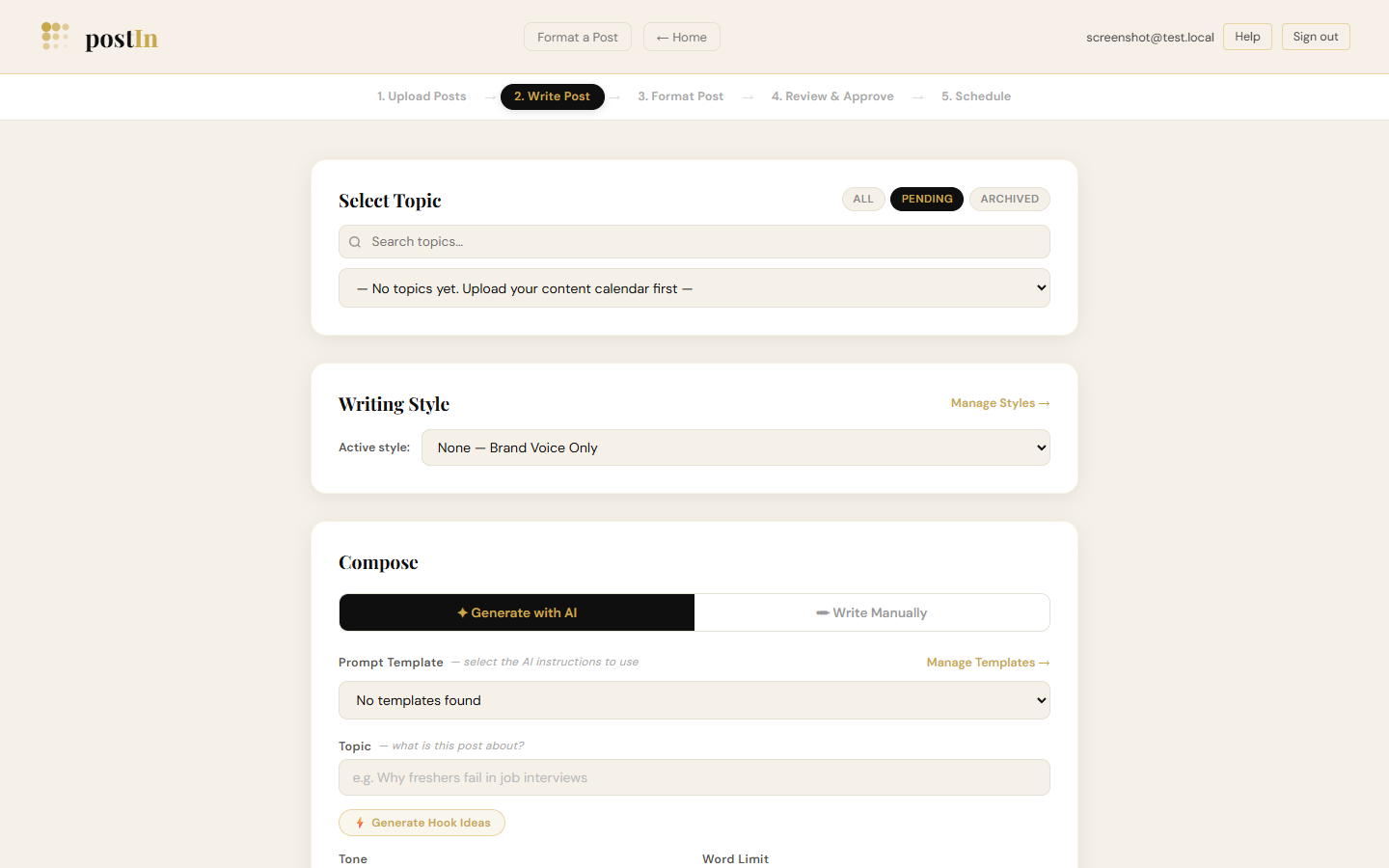
postin.in/writer.html — 2. Write Post
PostIn AI Writer — select topic, writing style, generate with Claude AI

Pick any topic from your calendar. Choose a writing style. Claude AI writes the full post in seconds.

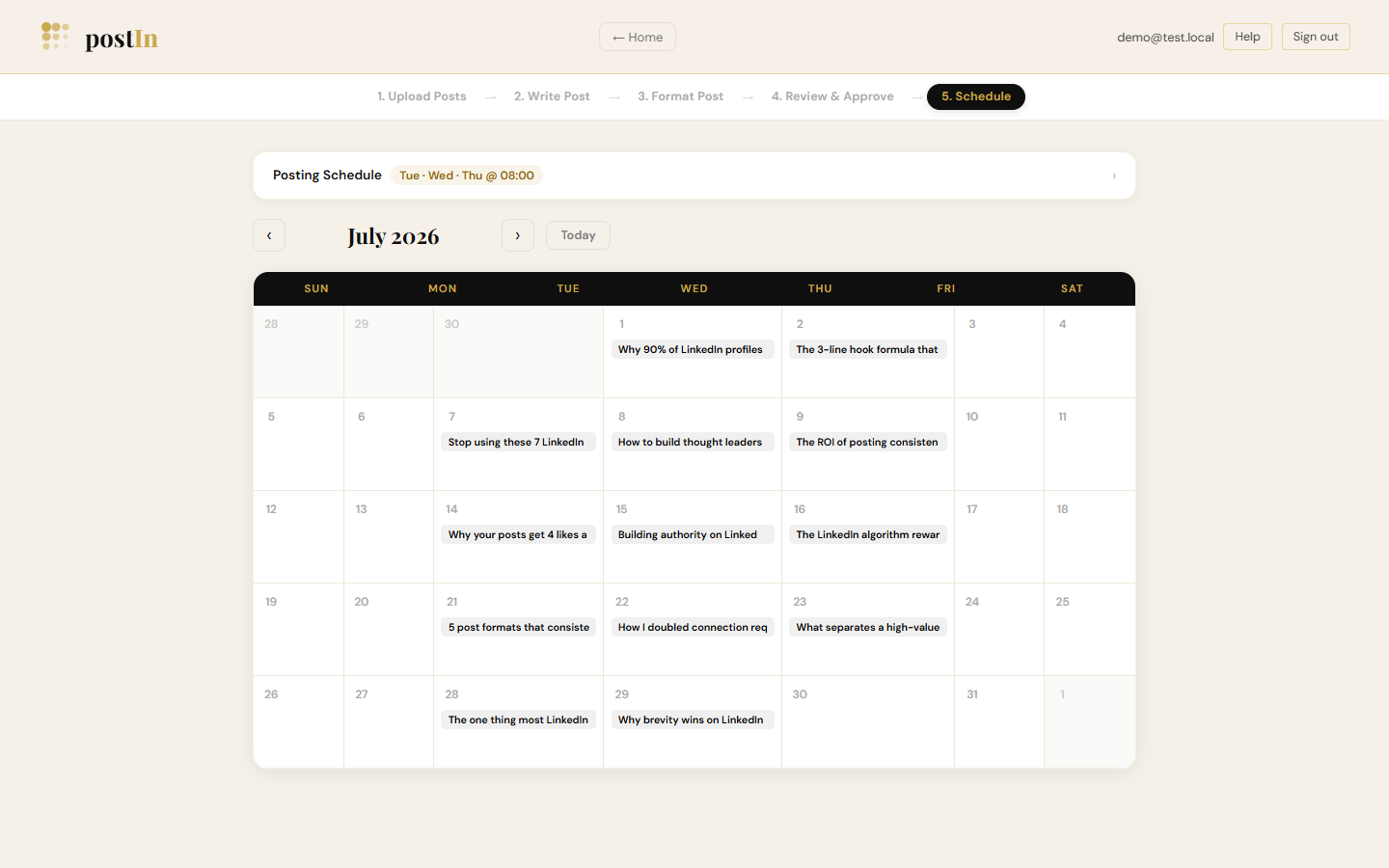
postin.in/schedule.html — 5. Schedule
PostIn scheduling calendar — assign posts to dates for auto-publishing

Assign approved posts to dates. PostIn auto-publishes each one to LinkedIn at the right time.

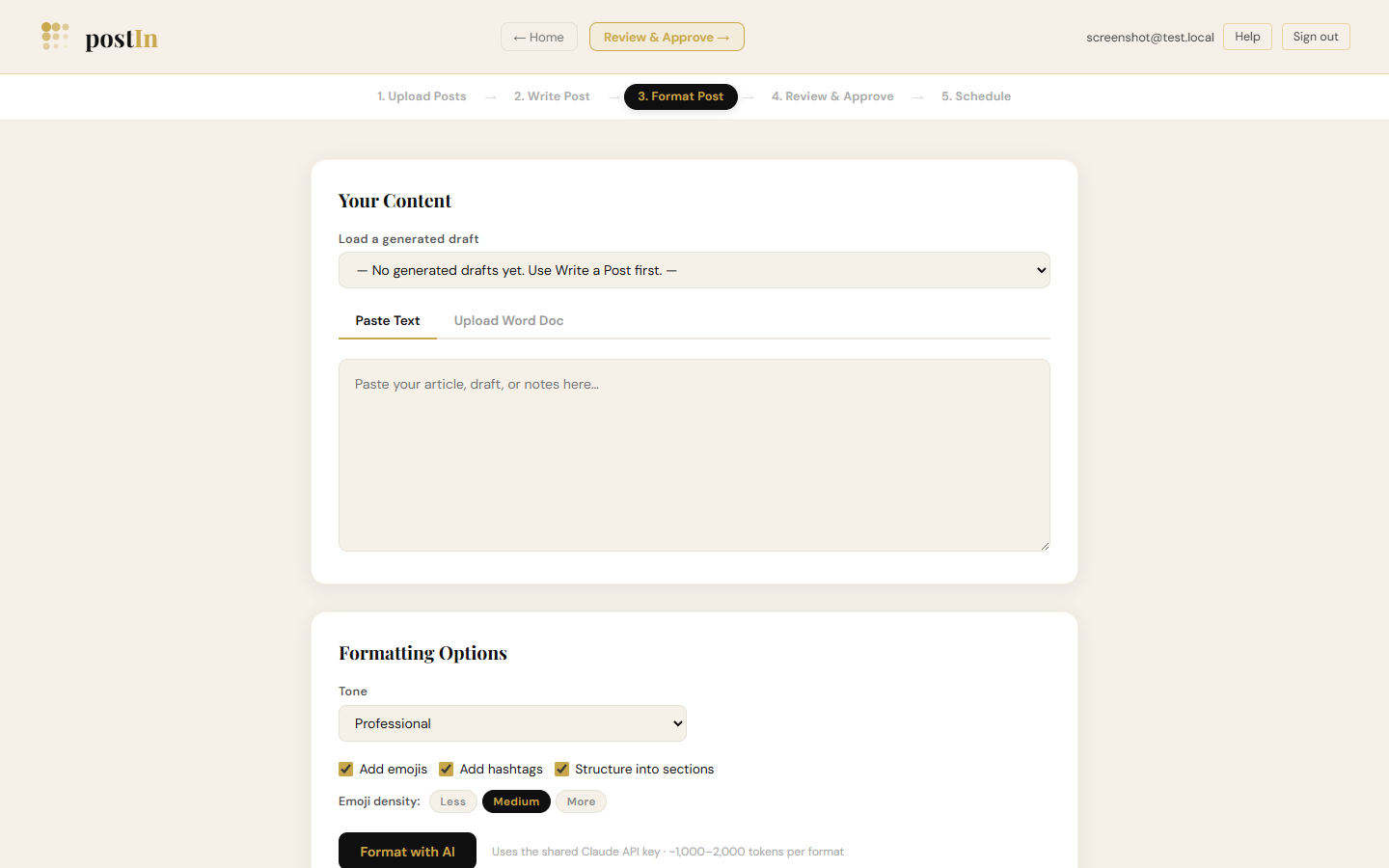
postin.in/formatter.html — 3. Format Post
PostIn LinkedIn formatter — paste text, format with AI for maximum reach

Paste any draft or upload a Word doc. One click adds bold, emojis, spacing, and hashtags.

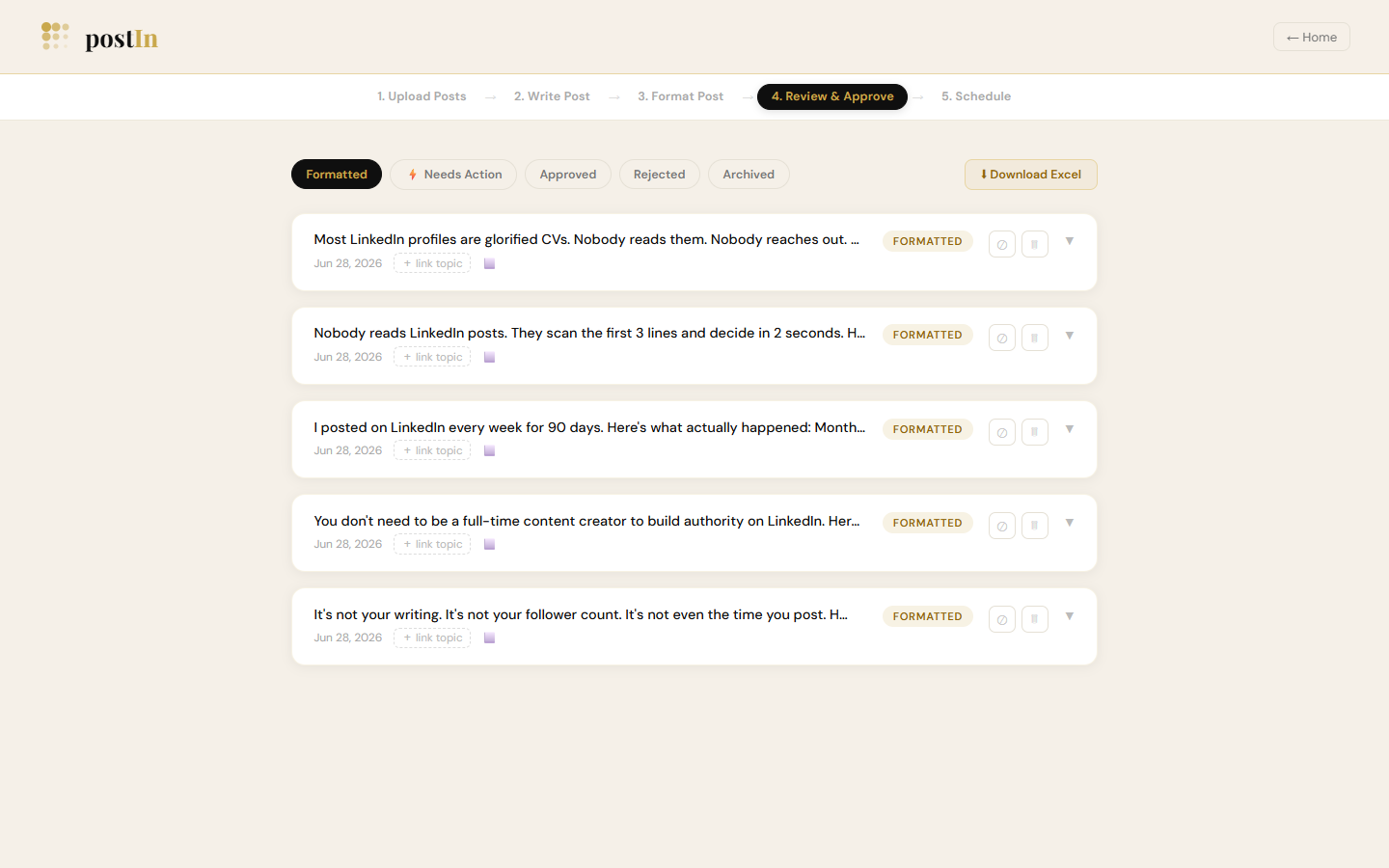
postin.in/review.html — 4. Review & Approve
PostIn review queue — approve or reject generated posts before they go live

Every post lands in your review queue first. Approve, edit, or reject — nothing goes live without your sign-off.

postin.in/writer.html
PostIn AI Writer screen
AI Post Writer

Generate complete LinkedIn posts
in your exact voice.

Pick any topic from your content calendar, select a writing style, and let Claude AI draft a full post — hooks, body, and hashtags — that sounds exactly like you wrote it. Not generic. Not robotic.

  • Custom brand voice via prompt templates you control
  • Multiple named writing styles per account
  • Hook generator to stop the scroll
  • Word count, tone, and emoji density controls
  • Cost tracker — know exactly what each post costs to generate
postin.in/schedule.html
PostIn scheduling calendar
Content Calendar

See your whole month.
Schedule with one click.

Assign approved posts to specific dates on your monthly calendar. Set your posting days and time once. PostIn auto-publishes each post to LinkedIn at exactly the right moment — without you having to be online.

  • Monthly calendar view of all scheduled posts
  • Set custom posting days and time (e.g. Tue · Wed · Thu @ 08:00)
  • Auto-publish to LinkedIn via official API
  • No browser extensions — server-side publishing
postin.in/formatter.html
PostIn LinkedIn formatter
LinkedIn Formatter

From raw text to
LinkedIn-ready in seconds.

Paste any draft, notes, or article. Upload a Word doc. The formatter applies Unicode bold, proper line spacing, emojis, a hook, and your fixed hashtags — everything the LinkedIn algorithm rewards, in one click.

  • Paste text or upload .docx files
  • Unicode bold text that renders on LinkedIn
  • Adjustable emoji density (Less / Medium / More)
  • Auto-injects your brand hashtags
  • Tone selector: Professional, Conversational, Bold
Review & Approve

Nothing goes live
without your sign-off.

Every AI-generated post lands in your review queue first. Read it, edit if needed, then approve. Rejected posts stay in draft. Approved posts move straight to your schedule — no copy-pasting, no switching tabs.

  • Formatted post preview before you approve
  • One-click approve → moves to schedule queue
  • Inline edit if the AI missed the mark
  • Download all posts as Excel for team review
postin.in/review.html
PostIn review queue — approve posts before they publish
Who uses PostIn

Built for professionals
who value their time.

Consultant using PostIn
Consultants & Coaches
Build authority, effortlessly

Turn your expertise into a consistent LinkedIn presence — without spending hours at the keyboard every week.

Founder using PostIn
Founders & Entrepreneurs
Stay visible, stay in demand

LinkedIn builds pipeline and inbound. PostIn keeps you posting consistently — even through your busiest quarters.

Content creator using PostIn
Content Creators
More output, less effort

Batch your ideas once a month. PostIn writes, formats, and publishes while you focus on work that pays.

Marketing team using PostIn
Agencies & Teams
Scale LinkedIn for clients

Run LinkedIn content for multiple team members from one dashboard. The Agency plan was built for this.

What users say

Real people.
Real results.

★★★★★

I used to spend 3 hours every Sunday writing and scheduling posts. Now I upload my topics on Friday evening and forget about it. My posting consistency went from 'occasional' to 5 posts a week — without any extra effort.

A
Ananya Sharma
Founder, EdTech Startup · Bangalore
★★★★★

The AI actually writes in my voice — not generic LinkedIn fluff. I gave it 3 sample posts and it figured out my tone in one shot. Clients now ask me how I produce so much content. The answer is PostIn.

R
Rohit Mehta
Business Coach · Mumbai
★★★★★

₹999/month for something that replaced a ₹15,000/month content writer. The formatting is so good — Unicode bold, spacing, hashtags — my reach literally doubled from the first week. This is criminally underpriced.

P
Priya Nair
HR Consultant · Hyderabad
Why PostIn

The honest comparison.

What it actually costs to stay consistent on LinkedIn — three ways.

What you get Doing it yourself Hiring a writer PostIn
Time per week 3–5 hours ~30 min briefing ~15 min setup
Monthly cost ₹10,000–₹25,000 from ₹833
Consistent brand voice Depends on mood Depends on writer Always
Auto-publishes to LinkedIn
Content calendar import You provide it Built-in
AI draft generation
Full editorial control Limited Review queue
Simple pricing

Start free.
Upgrade when ready.

No auto-renewals. No hidden fees. Start with a free account today — upgrade to unlock scheduling and unlimited AI posts.

Founder Pricing
These rates are locked in now — prices will increase as the product grows. Early subscribers keep their tier forever.
Free
₹0 / forever
5 AI post generations/month. Formatter unlimited. No scheduling.
  • 5 AI post generations/month
  • Unlimited LinkedIn formatter
  • Hook generator
  • Save & manage drafts
  • No scheduling or LinkedIn publishing
Start Free →
Monthly
₹999 / month
30 AI posts/month. Full scheduling, publishing and LinkedIn integration.
  • 30 AI post generations/month
  • Unlimited LinkedIn formatter
  • Content calendar import
  • Auto-schedule & publish
  • Writing styles & templates
Get Started →
Save 35%
Annual
₹7,799 / year
₹650/month — best value
Pay once, publish all year. Serious creators choose annual.
  • 30 AI post generations/month
  • Unlimited LinkedIn formatter
  • Content calendar import
  • Auto-schedule & publish
  • Writing styles & templates
Get Started →

Managing multiple LinkedIn profiles? Contact us about agency pricing.

Questions

Common questions.

What is the Anthropic API key and do I need one?
Yes. PostIn uses Claude by Anthropic to generate posts. You need a free API key from console.anthropic.com. Anthropic gives you starter credits on signup — enough for weeks of posts before any charges apply. Typical cost for generating 20 posts/month is ₹50–100, billed directly by Anthropic (not by us).
Is this a recurring subscription?
No automatic billing. Each payment is manual and gives you access for the chosen period. Your license key includes an expiry date — you'll need to renew before it expires to keep access. Your data is never deleted even if your subscription lapses.
How does the LinkedIn connection work?
PostIn uses LinkedIn's official OAuth API. You create a free LinkedIn Developer App (takes ~5 minutes), add PostIn as an authorised app, and connect with one click. You approve the connection on LinkedIn's site — your password never leaves LinkedIn. Tokens last ~60 days and can be refreshed at any time.
Can I use this to manage multiple LinkedIn profiles?
The Solo plan connects one LinkedIn profile. If you're an agency managing multiple clients, contact us at support@postin.in for agency pricing.
What happens to my posts if I don't renew?
Your account is locked at expiry but your data — posts, calendar, styles, templates — is preserved. When you renew and register with your new license key, everything will be exactly where you left it.
How does payment work?
Payment is processed securely by Razorpay — supporting UPI, all major cards, and net banking. Once payment is confirmed, your license key is emailed to you within a minute. Use it to complete registration at /onboard.html.